Gold Faux Sequins Embroidered Letters: A Practical Guide to Digital Assets for Crafters
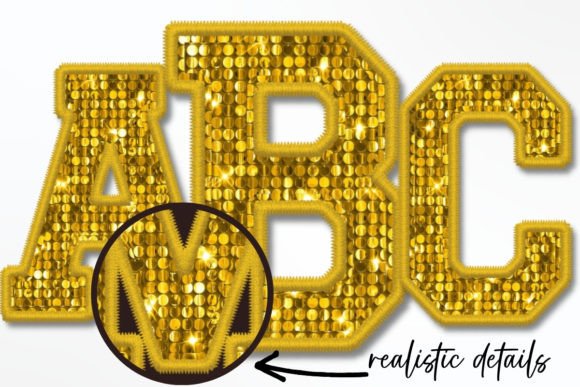
In the world of digital design and DIY crafting, texture is everything. Flat colors often fail to capture attention, which is why Gold Faux Sequins Embroidered Letters have become a staple for creators looking to add a touch of luxury and depth to their projects. Whether you are designing wedding invitations, creating custom apparel, or building social media graphics, these assets offer a sophisticated aesthetic without the high cost of physical embroidery. However, moving from physical materials to digital files introduces a unique set of challenges. Many beginners and even experienced designers overlook critical technical details, leading to frustration and wasted time.
Understanding exactly what you are buying—and more importantly, what you are not buying—is the first step toward successful implementation. This guide addresses common pitfalls associated with using gold faux sequin textures and provides actionable advice to ensure your projects look professional and polished.
Mistaking PNG Files for Installable Fonts
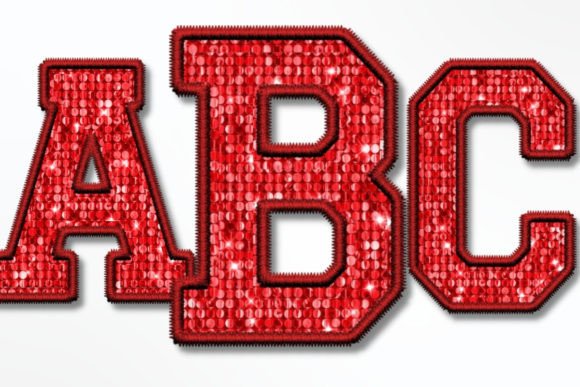
The most frequent misunderstanding among new buyers is the assumption that a package of alphabet images functions like a standard font file. It does not. When you purchase a set of Gold Faux Sequins Embroidered Texture Sports Alphabet Numbers PNG files, you are acquiring individual image files, not an installable typeface (such as .otf or .ttf). This distinction is crucial for your workflow.
If you attempt to "install" these files into your computer’s font library, they will not appear in your word processor’s font dropdown menu. Instead, each letter, number, and symbol exists as a separate graphic. To use them, you must insert each character individually into your design software. For a short phrase like "LOVE," this is manageable. For a long paragraph, it is inefficient. Recognizing this limitation early helps you choose the right tool for the job. These assets are ideal for headlines, logos, monograms, and short signs, but they are not suitable for body text.
Overlooking Resolution and DPI Requirements
Quality is non-negotiable when dealing with textured designs. A common mistake is downloading low-resolution images that appear crisp on a screen but pixelate when printed. The Gold Faux Sequins Embroidered Letters discussed here are provided at 300 dpi (dots per inch) with dimensions of 1200 x 1200 pixels (approximately 4 x 4 inches). This resolution is the industry standard for high-quality printing.
If you stretch these images beyond their intended size without checking the resolution, the intricate sequin texture will blur, losing the realistic embroidered effect. Always verify the dimensions before placing the image into your canvas. If you need a larger output, such as a banner, ensure your design software can handle upscaling without significant quality loss, or consider vector alternatives for massive formats. For most sublimation prints, iron-on transfers, and standard signage, the provided 300 dpi resolution is perfect.
Ignoring Software Compatibility
While PNG files are universally supported, not all software handles them with the same ease. Users often assume that because a file is a PNG, it will work seamlessly in every program without adjustment. This is rarely the case. Programs like Photoshop, Cricut Design Space, Silhouette Studio, and Microsoft Word all process transparent backgrounds differently.
For instance, in Cricut Design Space, you may need to use the "Contour" or "Weld" tools if you are combining letters, although since these are raster images, welding is less about cutting paths and more about visual grouping. In Photoshop, layer management is key to maintaining the transparent background. Before purchasing, confirm that your preferred software supports PNGs with transparency. If you are using older or basic editing tools, test a free sample if available, or research specific tutorials for importing transparent PNGs into your specific platform. Customers are responsible for knowing how to operate their software; assuming the file will "just work" often leads to unnecessary support tickets and delays.
Neglecting the Transparent Background Advantage
The primary benefit of these Gold Faux Sequins Embroidered Texture Sports Alphabet Numbers PNG files is the transparent background. This feature allows you to place the gold letters over any color, pattern, or photo without a white box surrounding them. However, a common error is saving or exporting the final design in a format that does not support transparency, such as JPEG.
When you finish your design, always export your final project as a PNG or PDF to preserve the transparency. If you save as a JPEG, the transparent areas will turn white, defeating the purpose of using a transparent asset. Additionally, when working in your design software, ensure that your canvas background is set to transparent or checkered (indicating transparency) so you can accurately preview how the gold sequins will interact with underlying layers.
Underestimating the Value of Immediate Access
One of the greatest advantages of digital products is immediacy. Your item is available for downloading IMMEDIATELY after payment is received. Yet, many users do not prepare their workspace beforehand. Because there are 42 PNG files included in the package—covering full uppercase letters, numbers 0-9, and extra symbols—it is wise to organize these files before you start designing.
Create a dedicated folder on your computer or cloud storage for these assets. Unzip the file immediately upon download. Trying to locate specific letters in a compressed zip file while in the middle of a creative flow breaks momentum. By organizing your Gold Faux Sequins Embroidered Letters ahead of time, you streamline your workflow and reduce friction during the design process.
Best Practices for Sublimation and Iron-On Projects
For those using these designs for sublimation or heat transfer vinyl (HTV) projects, print quality is paramount. Since these are raster images, ensure your printer settings are configured for high-quality photo printing. When using iron-on transfers, remember that the gold faux sequin effect is printed ink, not actual thread. Therefore, the vibrancy of the gold depends heavily on your printer’s color profile and the quality of the transfer paper.
Always perform a test print on regular paper first to check sizing and color accuracy. This simple step prevents wasting expensive sublimation paper or fabric. Additionally, because the design mimics embroidery, it looks best on solid-colored fabrics where the texture can stand out. Avoid placing these gold letters on busy, patterned backgrounds unless you add a solid backing or shadow to ensure legibility.
Making the Right Choice for Your Project
Before finalizing your purchase, ask yourself: Does my project require short, impactful text? Do I have the software skills to manipulate individual PNG files? Am I prepared to manage 42 separate image files? If the answer is yes, then Gold Faux Sequins Embroidered Letters are an excellent choice. They offer a high-end look for crafting, signs, and digital marketing materials without the complexity of actual stitching.
By avoiding the common mistakes of misidentifying file types, ignoring resolution limits, and neglecting software compatibility, you can leverage these assets to create stunning, professional-grade designs. Remember, the tool is only as good as the user’s understanding of it. Take the time to learn your software, respect the file formats, and plan your workflow. With these precautions in place, your creative projects will shine with the luxurious appeal of gold sequins, effortlessly and efficiently.