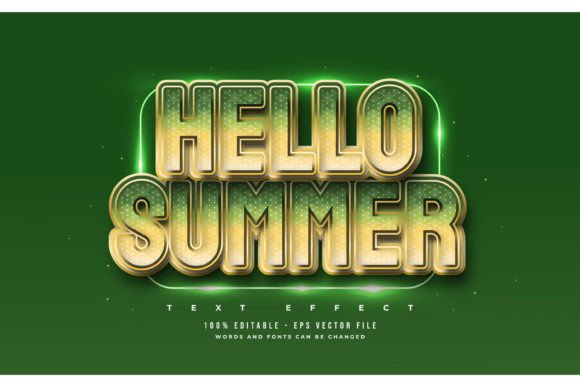
Mastering the 3D Bold Green Text Style Effect
Visual hierarchy is the backbone of effective graphic design. When you are trying to capture attention in a crowded digital landscape, standard flat typography often gets lost in the noise. This is where the 3D Bold Green Text Style Effect becomes an invaluable asset for creators. It is not merely about making letters look thick; it is about adding depth, dimension, and a vibrant pop of color that draws the eye immediately. For designers, marketers, and content creators who need high-impact visuals without spending hours manually constructing shadows and extrusions, this tool offers a streamlined solution.
Understanding the distinction between a font file and a text effect design is crucial. Many beginners mistakenly believe they are downloading a new typeface to install on their computer. However, this resource is a Text Font Effect Design, specifically built for Adobe Illustrator. This means you are not limited to a single typeface. You retain the freedom to change or use any font you like, applying the sophisticated 3D styling to your preferred typography. This flexibility ensures that your brand identity remains consistent while leveraging professional-grade visual enhancements.
Why Dimensional Typography Matters in Modern Design
In an era where users scroll through hundreds of images daily, static designs struggle to compete. The human brain is wired to notice contrast and depth. A 3D Bold Green Text Style Effect mimics physical objects, creating a sense of weight and presence that flat text cannot achieve. The choice of green is particularly strategic. Green is universally associated with growth, energy, money, and nature. When combined with a bold, three-dimensional structure, it conveys confidence and vitality.
Consider the psychological impact. A flat green headline might feel informative, but a bold, extruded green headline feels authoritative and dynamic. This subtle shift can significantly influence how your audience perceives your message. Whether you are promoting a financial service, an eco-friendly product, or a high-energy event, the dimensional aspect adds a layer of professionalism and polish that suggests high production value.
Streamlining Your Workflow with Editable Assets
Time is the most scarce resource for freelancers and small business owners. Creating complex 3D text effects from scratch in Adobe Illustrator requires a deep understanding of blending tools, gradient meshes, and perspective grids. It is a time-consuming process that can take hours to perfect. This is why pre-made assets like the Adobe Illustrator Text Style Effect – 100 Editable Words, Fonts, Size, and Effect package are so appealing.
The primary value proposition here is efficiency. The package includes EPS files and JPG previews, making it easy to visualize the final result before diving into editing. The "Easy to Edit Just Click and Change The Texts" feature is not just a marketing claim; it is a functional reality for those using vector-based software. By utilizing graphic styles or appearance panel presets included in the EPS file, you can swap out placeholder text for your own copy in seconds. The effect automatically recalculates, maintaining the integrity of the shadows, highlights, and 3D perspective.
- Instant Professionalism: Achieve a high-end look without advanced technical skills.
- Consistency: Ensure all your headers and titles share the same visual language.
- Versatility: Apply the effect to short headlines, logos, or call-to-action buttons.
Practical Applications Across Industries
The versatility of this text effect allows it to fit seamlessly into various contexts. For entrepreneurs and marketers, it is an excellent tool for social media graphics. Instagram stories, Facebook ads, and LinkedIn banners benefit greatly from bold, readable text that stands out against busy backgrounds. The green hue works exceptionally well for brands focused on sustainability, finance, health, or technology.
Educators and course creators can also leverage this style. When designing slide decks or educational thumbnails, clear, dimensional text helps emphasize key concepts. It breaks up monotony and keeps learners engaged. Similarly, bloggers and website owners can use these assets to create striking featured images or hero sections that reduce bounce rates by capturing immediate interest.
For small business owners, this effect is perfect for promotional materials. Imagine a sale flyer for a garden center or a grand opening announcement for a new cafe. The 3D green text adds a festive, energetic vibe that plain text lacks. It transforms a simple announcement into a visual event.
Important Considerations for Best Results
While the tool is designed to be user-friendly, there are important factors to consider to ensure your design remains effective. First, remember that this is a design effect, not a font. You must have Adobe Illustrator to edit the core vector properties effectively. If you are unfamiliar with vector software, take some time to learn the basics of selecting objects and editing text paths. The learning curve is gentle, but basic familiarity is required.
Second, consider legibility. While 3D effects are visually striking, they can sometimes reduce readability if overused. Use the 3D Bold Green Text Style Effect for headlines, titles, and short phrases rather than long paragraphs. The complexity of the shadow and depth works best when the viewer has only a few words to process. Keep your messaging concise to maximize impact.
Third, think about color harmony. Green is a dominant color. Ensure that the rest of your design palette complements it rather than clashes with it. Neutral backgrounds like white, black, or light gray often allow the green 3D text to pop most effectively. Avoid placing it against busy patterns or similar shades of green, which can cause the text to blend in rather than stand out.
Maximizing the Value of Your Design Assets
To get the most out of the Adobe Illustrator Text Style Effect – 100 Editable Words, Fonts, Size, and Effect package, experiment with different typefaces. Since the effect is applied to the text object, switching from a sans-serif font to a serif font can completely change the mood of the design. A chunky sans-serif might look modern and tech-forward, while a bold serif could look more established and traditional, all while retaining the same 3D green styling.
Additionally, do not hesitate to adjust the size and positioning. The scalable nature of EPS files means you can resize the text for anything from a business card to a billboard without losing quality. This scalability is a huge advantage for professionals who need to repurpose content across multiple platforms.
Finally, always review the JPG preview included in the files. It serves as a quick reference guide for how the effect should look when properly applied. If your edited text looks different, check your layer structure and ensure you have not accidentally altered the underlying graphic styles. With a little practice, you will find that this tool significantly accelerates your design workflow, allowing you to focus more on creativity and less on technical execution.
By integrating this 3D Bold Green Text Style Effect into your toolkit, you are investing in both speed and quality. It empowers you to produce visually compelling content that resonates with your audience, supports your brand goals, and stands out in a competitive digital environment. Whether you are a seasoned designer looking to save time or a beginner eager to create professional-looking graphics, this resource provides the bridge between idea and execution.